
Building a Facial Tension Detector, Part 2
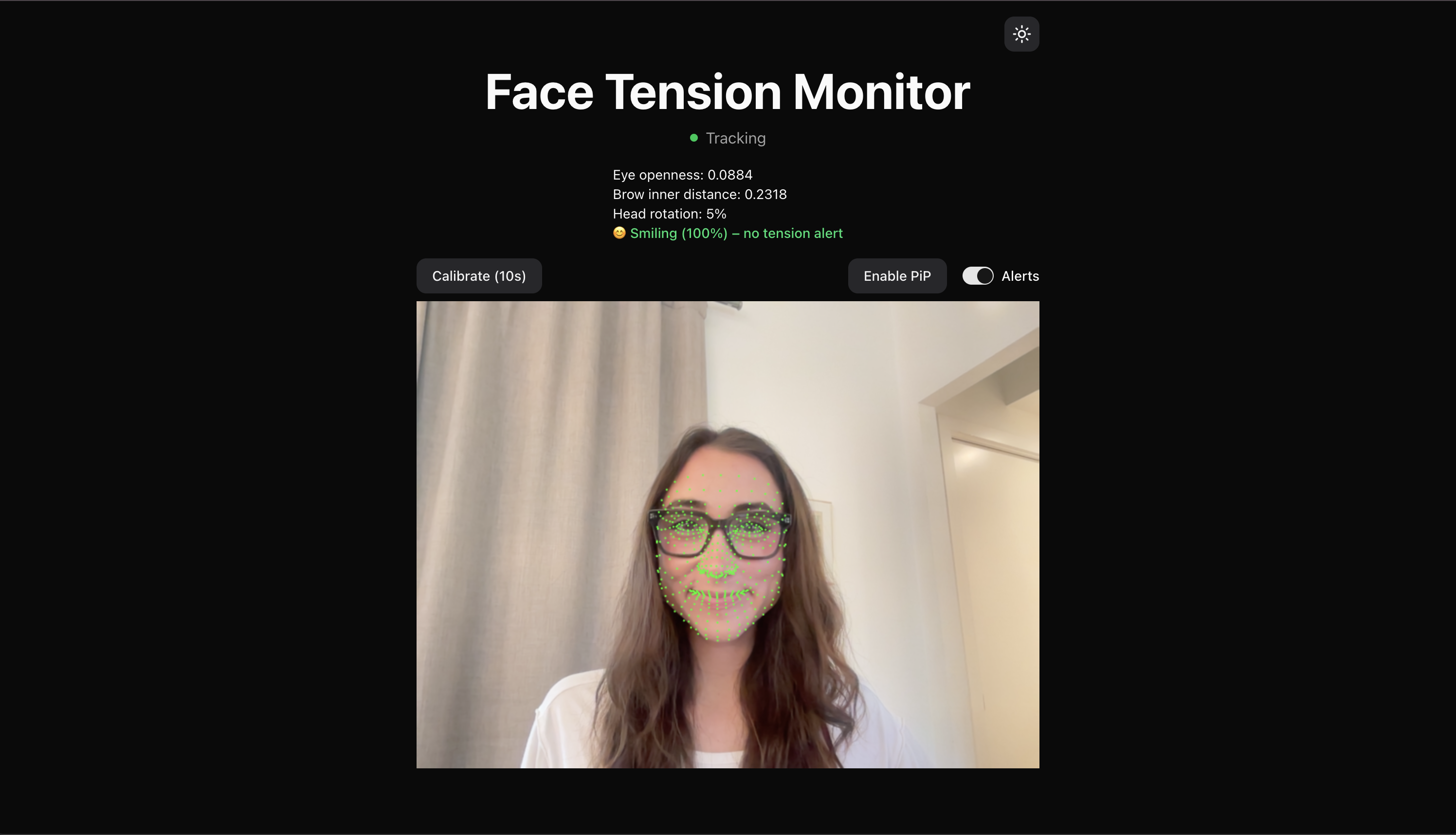
Part 1 of this series introduced the facial tension detector I am building, inspired by a rough night in the ER with a migraine. I am building this project to explore whether making facial tension visible and interruptible can meaningfully change how often it spirals into pain.
The first post covered computing facial signals, calibrating a personal neutral baseline, and laying out what I hoped the system could eventually become.
This post picks up once the system started acting on those signals. Specifically, it covers what happened when I introduced alerting for the first time, why it immediately became annoying, and how that annoyance reshaped the direction of the project.
Implementing the First Alert Loop
With a neutral baseline reliably calibrated using my first two signals, inner eyebrow distance and eye openness, I was ready to start alerting. Or so I thought... We will get to that.
For the first pass, I kept the alerting logic intentionally simple. If a signal deviated more than 10 percent from neutral for at least three seconds, the system would consider that “tension.” At this stage, the goal was not to get it totally right. It was to observe behavior and see what broke once the system started reacting.
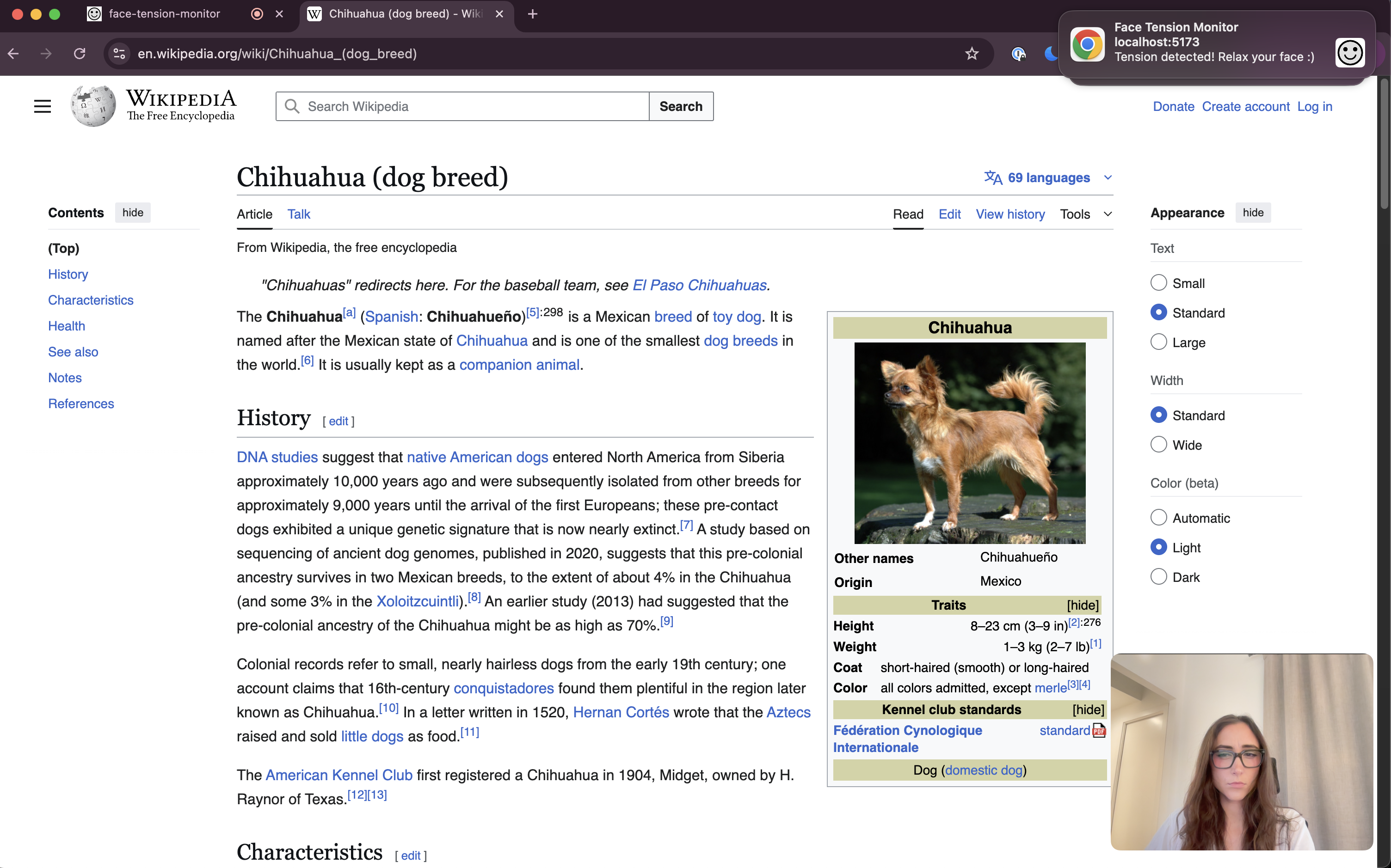
I used the Web Notifications API to send a notification reminding me to relax my face when tension was detected. After spending an unfortunate amount of time debugging what I assumed was a mistake in my very simple setup, I eventually realized my Do Not Disturb setting was on. The notifications were working fine, but I was not. I felt silly, to put it kindly to myself.
That detour ended up being useful, though. Since I tend to work with my devices on some version of DND anyway, relying solely on notifications was clearly not practical. So I added a gentle audio cue that plays when an alert fires.
Thanks to Claude and the tiny bit of music theory knowledge I have, I created a utility that plays a soft C major chord using the Web Audio API, with a subtle fade in and out. The sound is noticeable, but not jarring. After that, I honestly suspect the sound alone might be enough. I already associate it with “check your face,” and the less disruptive the interruption, the better. For now, I kept both in place while I learned how the system behaved.
At this point, the project was officially alive, but it was also very annoying.
Annoying Is on the Path to Useful
I was genuinely giddy to have the alerts firing when my face was tensing, but they were soon also firing when I was doing just about anything else.
In my excitement that the app was correctly detecting tension and sending notifications, I immediately took a video to show my family. Very “do you like my drawing?” child energy. At the end of the video, I smiled and got alerted. Huh…
I stopped recording, turned to look at my dog chewing on her bone, and got alerted again. Huh again…
It quickly became clear these were not isolated bugs, but rather mismatches between signal and meaning. What I had instructed the system to interpret as “tension” was really picking up on any notable facial change in the signals I was tracking. The system was doing what I asked, but not being particularly helpful. I don’t want the app yelling at me every time I smile, talk, or glance away from my screen. After all, I’m trying to reduce a migraine trigger, not eliminate joy.
That constant, low-grade annoyance ended up being informative. The app was behaving as I’d programmed it to. The problem was that I had not yet taught it what not to react to.
A Shift in Direction: Detecting Change Is Not the Same as Detecting Tension
That realization changed how I thought about the problem. Up until this point, I had been focused on whether the system could detect tension at all. Now the question was narrower, and harder. Could it tell the difference between meaningful tension and normal, harmless movement?
The system wasn’t wrong, it was just overly literal. It responded to change, not context. Smiling, talking, turning my head, or reacting to something off screen all registered as deviations from neutral, even though none of those things were tension in the way I cared about.
Once I started paying attention to when alerts fired, the problem reframed itself. “What should trigger an alert?” was only half the question. The other half, and arguably the more important one, was “what should not trigger one?”
That shift pushed me into the next phase of the project.
Teaching the System What to Ignore
False positives were unavoidable at this stage, but they were also useful. Instead of trying to solve everything at once, I focused on the two biggest sources of noise I was seeing in practice. Addressing just these made the system significantly calmer and more usable.
Head Turning
One of the most common false positives happened when I turned my head.
As my face rotated away from the camera, the landmark measurements became less reliable. In particular, the apparent width of my face shrank as it angled away, which threw off the normalization I was using for tension signals. That made things like inner brow distance look artificially smaller.
Rather than trying to fix tension detection in these cases, I decided to treat head rotation as a reason to opt out entirely. Naturally, if I’m not looking at my screen, I’m probably not working in that moment.
I introduced a simple head rotation signal based on facial symmetry. It compares the distance from the nose bridge to the left and right edges of the face.
When facing forward, those distances are roughly equal. When the head turns, one side becomes more visible than the other.
I normalize that ratio to a value between -1 and 1:
const asymmetryRatio = noseToLeft / noseToRight;
const headRotation = (asymmetryRatio - 1) / (asymmetryRatio + 1);
Once the absolute value crosses a threshold, I skip both tension and smile detection. At that angle, the 2D landmark measurements are no longer reliable enough to make meaningful judgments anyway (at least with my current knowledge).
I landed on a 50 percent asymmetry threshold after experimenting on myself. It works reasonably well for now, but this is very much a “good enough” heuristic and something that should eventually be configurable per user.
Smiling
Smiling turned out to be the biggest source of false positives.
Genuine smiles naturally reduce eye openness. To my original logic, a smile looked indistinguishable from stress or intense concentration.
I initially tried using mouth width alone as a smile signal, but that was either too sensitive or not sensitive enough. After digging into how smiles actually show up in the face, I added three mouth and cheek specific signals:
Mouth width: the distance between mouth corners increases during a smile
Mouth corner lift: the corners of the mouth rise relative to the upper lip
Cheek raise: cheeks push upward toward the eyes, shortening the distance between mouth corners and the under-eye area
Each signal on its own is noisy, so I combine them into a weighted score and require at least two out of three to register before classifying something as a smile. This makes the system more resilient to talking, partial expressions, and minor head movement.
If a smile is detected, tension detection is skipped entirely. Narrow eyes in that context are expected, not concerning.
UX for Sanity, Not Aesthetics
While working through all of this, I had to confront a different kind of problem: my own tolerance.
Before the smile and head turning logic were in place, I added a simple toggle to mute alerts so I wouldn’t lose my mind while testing. I also added Picture in Picture mode so the camera feed and detection could continue while I switched tabs or apps. This image was obviously forged as a demonstration, as I would never feel tense while looking at chihuahuas…
I also made a few minor UI changes that weren't about making things look nice, but keeping my sanity. Small moments of visual calm. When you are staring at a tool for hours while iterating, bad UX adds mental load very quickly.
I also realized that storing the neutral baseline in React state, which means recalibrating every time the page refreshed, was getting old. It’s fine for experimentation, but not for daily use. Persisting neutral calibration in local storage is now firmly on the to-do list.
None of this is glamorous work, but it makes a difference. The app needed to feel tolerable enough to keep using so I could keep learning from it.
Where This Leaves the System
The app is far from perfect, and more edge cases will certainly surface over time. But addressing head turning and smiling dramatically reduced noise and made alerts feel more intentional.
More importantly, it reinforced the core lesson of this phase of the project: accuracy in isolation is not enough. A system like this has to be selective, and teaching it what to ignore is just as important as teaching it what to notice.
What I’m Focusing on Next
Next, I want to make the system more durable. Persisting calibration, refining thresholds, and continuing to test in real working conditions. The goal is not perfection, but trust. If the alerts feel trustworthy, I might actually leave it running.
Until next time!